
Finviz Stock Screener Scraper
hipersoft/finviz-scraper
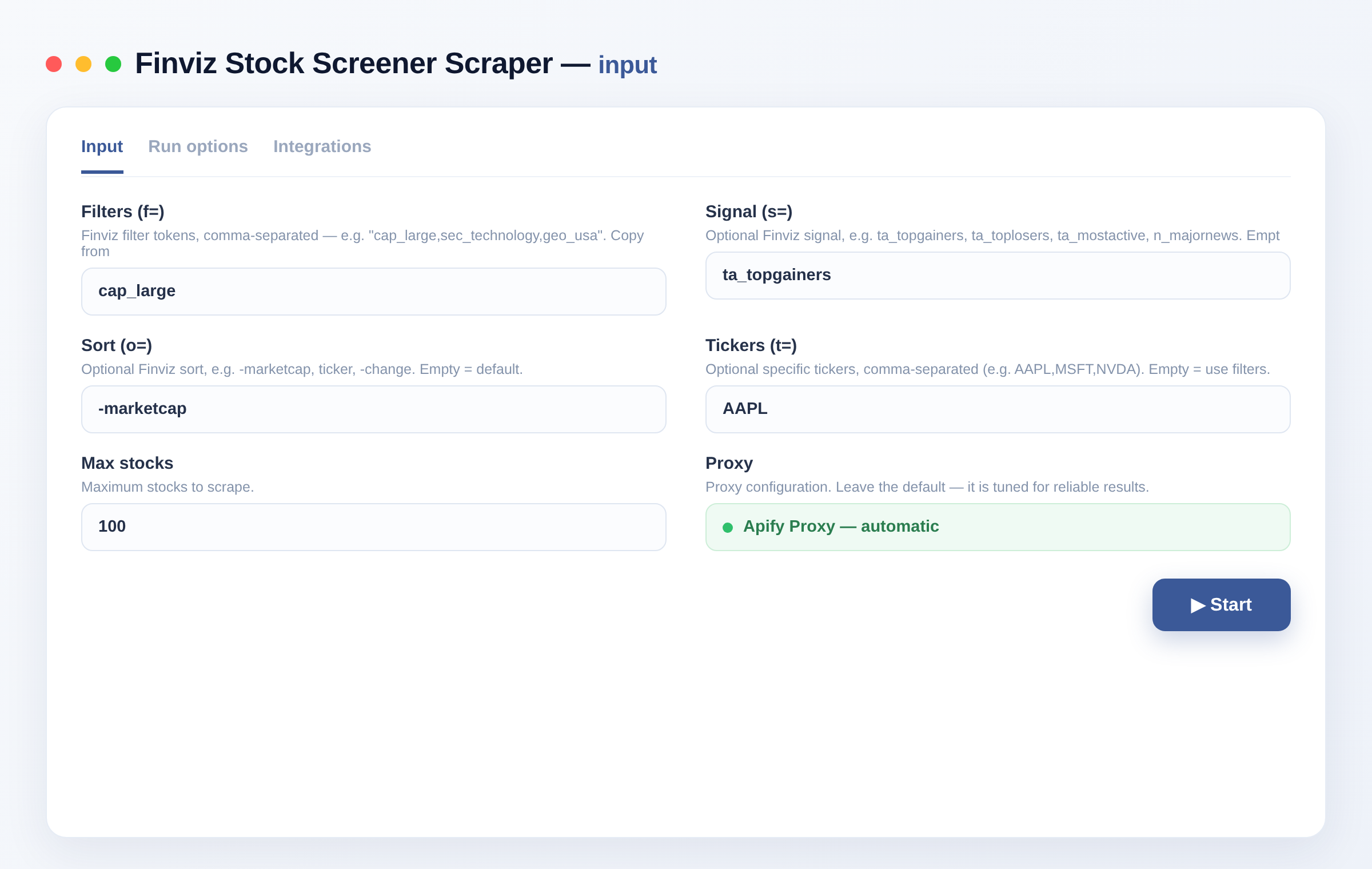
Scrape Finviz's stock screener: ticker, company, sector, industry, country, market cap, P/E, price, change and volume. Apply any Finviz filter, signal or sort. Bulk paginated export. No setup.
Total users
5Monthly users
3Total runs
110Per stock scraped
$0.001Last rebuilt
Oct 28, 2026Overview
Scrape the Finviz stock screener into clean JSON, CSV or Excel — ticker, company, sector, industry, country, market cap, P/E, price, change and volume for every stock matching your criteria. Apply any Finviz filter, signal or sort, then bulk-export across all result pages. No key, no login. Fast and reliable.
Great for stock screening, watchlists, quant research, dashboards and market scans.
What does Finviz Stock Screener Scraper do?
It reproduces any Finviz screen and extracts the full result set as structured data. Pass the same f= filters, s= signal and o= sort you use on Finviz — the Actor walks every result page and returns one clean record per stock, ready to export or pipe into a dashboard.
What you get
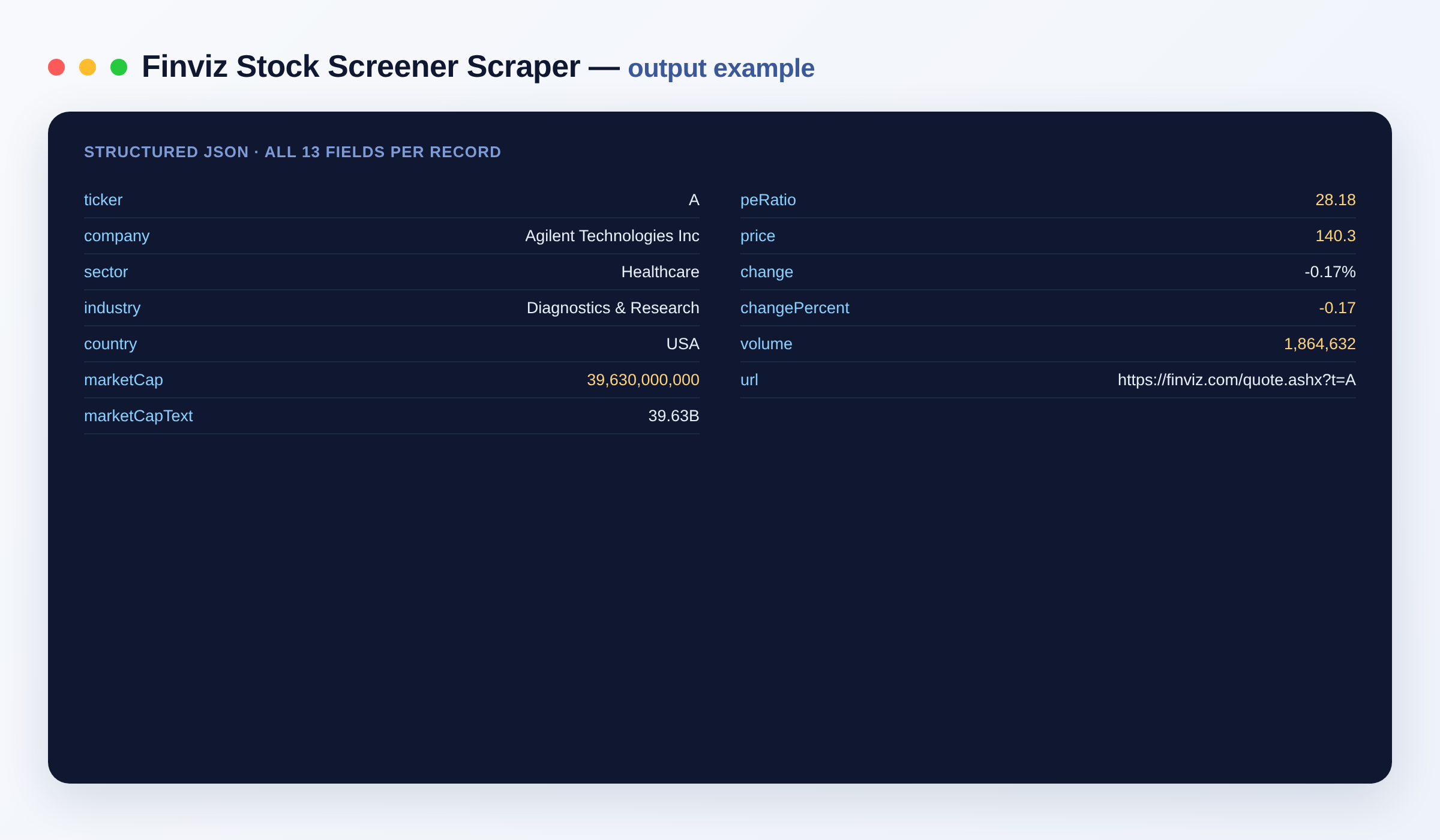
- 📊 Screener rows — ticker, company, sector, industry, country, market cap (numeric + text), P/E, price, % change, volume
- 🎚️ Any Finviz query — pass the same
f=filters,s=signal ando=sort you use on Finviz - 🎯 Specific tickers — or pass a list of tickers directly
- 📥 Bulk paginated — walks every result page automatically
Output schema
| Field | Type | Description |
|---|---|---|
ticker |
string | Stock ticker symbol (e.g. AAPL). |
company |
string | Company name. |
sector |
string | Sector the company belongs to. |
industry |
string | Industry classification. |
country |
string | Country of the company. |
marketCap |
integer | Market capitalization as a number. |
marketCapText |
string | Market cap in Finviz shorthand (e.g. 3.39T). |
peRatio |
number | Price-to-earnings ratio. |
price |
number | Latest share price. |
change |
string | Price change as a percentage string. |
changePercent |
number | Price change as a numeric percentage. |
volume |
integer | Trading volume. |
url |
string (URL) | Link to the stock's Finviz quote page. |
Use cases
- Stock screening — pull every stock that passes your fundamental or technical criteria.
- Watchlists — refresh a curated set of tickers on a schedule.
- Quant research — build datasets of sector, market cap, P/E and volume for modeling.
- Dashboards — feed a BI tool or spreadsheet with live screener output.
- Market scans — capture top gainers, most active or unusual-volume signals.
- Sector analysis — compare valuations across sectors and industries.
How to scrape Finviz data
- Add the Finviz Stock Screener Scraper to your Apify account.
- Build a screen on finviz.com/screener.ashx and copy the
f=value from the URL. - Paste it into
filters, add asignalandorderif you want, and setmaxItems. - Click Run.
- Export the results as JSON, CSV or Excel, or pull them via the Apify API.
Input
{
  "filters": "cap_large,sec_technology,geo_usa",
  "signal": "",
  "order": "-marketcap",
  "maxItems": 500
}
Where do filters come from? Build a screen on finviz.com/screener.ashx and copy the f= value from the URL (e.g. cap_large,fa_pe_u20). Paste it into filters.
| Field | Description |
|---|---|
filters |
Finviz f= filter tokens (comma-separated). |
signal |
Finviz s= signal (top gainers, most active…). |
order |
Finviz o= sort. |
tickers |
Specific tickers instead of filters. |
maxItems |
Max stocks to scrape. |
proxyConfiguration |
Proxy settings (residential recommended for large runs). |
Output
{
  "ticker": "AAPL",
  "company": "Apple Inc",
  "sector": "Technology",
  "industry": "Consumer Electronics",
  "country": "USA",
  "marketCap": 3390000000000,
  "marketCapText": "3.39T",
  "peRatio": 32.4,
  "price": 224.3,
  "change": "-0.35%",
  "changePercent": -0.35,
  "volume": 41234567,
  "url": "https://finviz.com/quote.ashx?t=AAPL"
}
Need more market data?
- Yahoo Finance Scraper — quotes and fundamentals
- CoinGecko Scraper — crypto market data
- SEC EDGAR Scraper — filings and financials
FAQ
Do I need a Finviz account? No. This scrapes the public screener — no key, no login.
How many stocks can I scrape?
As many as your screen returns; set maxItems to cap the run. The Actor paginates through every result page.
How do I filter to exactly what I want?
Configure the screen on Finviz, copy the f= value from the URL, and paste it into filters — the Actor reproduces that screen and exports all pages.
What export formats are supported? JSON, CSV, Excel and XML, plus the Apify API.
Can I integrate it with other tools? The Finviz Stock Screener Scraper can be connected with almost any cloud service or web app thanks to integrations on the Apify platform. It works with Make, Zapier, Slack, Airbyte, GitHub, Google Drive and many more, plus the Apify API, JavaScript/Python clients and MCP. Or use webhooks to trigger an action whenever a run finishes.
How does billing work? You pay only per item you get — cheap per stock, cheapest in its class.
Is the data public? Yes. The Actor returns only publicly available screener data.
Notes
Original clean-room implementation. Returns only public screener data; you are responsible for how you use the data and for complying with Finviz's terms. Not affiliated with or endorsed by Finviz.
Input
| Field | Type | Description |
|---|---|---|
filtersFilters (f=) | string | Finviz filter tokens, comma-separated — e.g. "cap_large,sec_technology,geo_usa". Copy from the f= parameter of a Finviz screener URL. Empty = all stocks. |
signalSignal (s=) | string | Optional Finviz signal, e.g. ta_topgainers, ta_toplosers, ta_mostactive, n_majornews. Empty = none. |
orderSort (o=) | string | Optional Finviz sort, e.g. -marketcap, ticker, -change. Empty = default. |
tickersTickers (t=) | string | Optional specific tickers, comma-separated (e.g. AAPL,MSFT,NVDA). Empty = use filters. |
maxItemsMax stocks | integer | Maximum stocks to scrape. Default: 100 |
proxyConfigurationProxy | object | Proxy configuration. Leave the default — it is tuned for reliable results. Default: {"useApifyProxy": true, "apifyProxyGroups": ["RESIDENTIAL"]} |
API
curl -X POST "https://api.apify.com/v2/acts/hipersoft~finviz-scraper/run-sync-get-dataset-items?token=$APIFY_TOKEN" \
  -H "Content-Type: application/json" \
  -d '{
  "filters": "cap_large"
}'
from apify_client import ApifyClient
client = ApifyClient("YOUR_APIFY_TOKEN")
run = client.actor("hipersoft/finviz-scraper").call(run_input={
"filters": "cap_large"
})
for item in client.dataset(run["defaultDatasetId"]).iterate_items():
print(item)import { ApifyClient } from 'apify-client';
const client = new ApifyClient({ token: 'YOUR_APIFY_TOKEN' });
const run = await client.actor('hipersoft/finviz-scraper').call({
"filters": "cap_large"
});
const { items } = await client.dataset(run.defaultDatasetId).listItems();
console.log(items);Pricing
| Event | Price | Paid plans from |
|---|---|---|
| Stock scraped One stock row scraped. | $0.001 | $0.001 |
| Page request One screener page fetched (20 stocks). | $0.0005 | $0.0005 |
You pay only for what the run returns. Set a maximum cost per run and it stops cleanly at that limit.
Related scrapers

Carousell Scraper
Scrape Carousell search listings: title, price, condition, location, seller, photo and URL. Requires your own Carousell app token.
242 runs · 2 users · $0.003 / listing scraped
Google Flights Scraper
Scrape flight options from Google Flights by route and date: airline, flight number, departure and arrival times, duration, stops, layovers and price. One-way or round-trip, any cabin and currency. For travel and price monitoring.
216 runs · 4 users · $0.004 / flight scraped
Pinterest Scraper
Search Pinterest and scrape pins (title, description, destination link, image, pinner, board, saves), boards and users. Fast. For visual research, e-commerce, trend and marketing analysis.
151 runs · 2 users · $0.0034 / item scraped
Google Trends Scraper
Scrape Google Trends for any keyword: interest over time, related and rising queries, and interest by region. Per country and timeframe. For SEO, market and trend research. No setup.
139 runs · 6 users · $0.001 / keyword scraped
AliExpress Product Search Scraper
Search AliExpress by keyword and export one clean row per product — title, sale price, original price, image and product URL. Export to JSON, CSV or Excel.
135 runs · 3 users · $0.003 / product scraped
Google Maps Scraper
Search Google Maps and scrape places: name, category, full address, city, coordinates, rating, phone, website, Place ID and map link. Fast browser-free via Google's internal endpoint, no setup. For local lead generation and market research.
130 runs · 2 users · $0.005 / place scrapedSend the site and the fields. We build it and you get it first.